Printer Not Printing Black? 10 Powerful Fixes to Restore Black Ink
Printer not printing black is a common issue that occurs when a printer fails to print black ink even though other colors may still print normally. When this happens, documents may appear faded, missing text, or completely blank where black ink should appear.
Most black ink printing problems are caused by clogged printheads, empty cartridges, incorrect printer settings, or driver issues. Inkjet printers are especially vulnerable because dried ink can block the printhead nozzles.
Fortunately, there are several troubleshooting steps that can help resolve a problem with black ink quickly. This guide explains the causes of the issue and provides step-by-step solutions to restore normal printing.
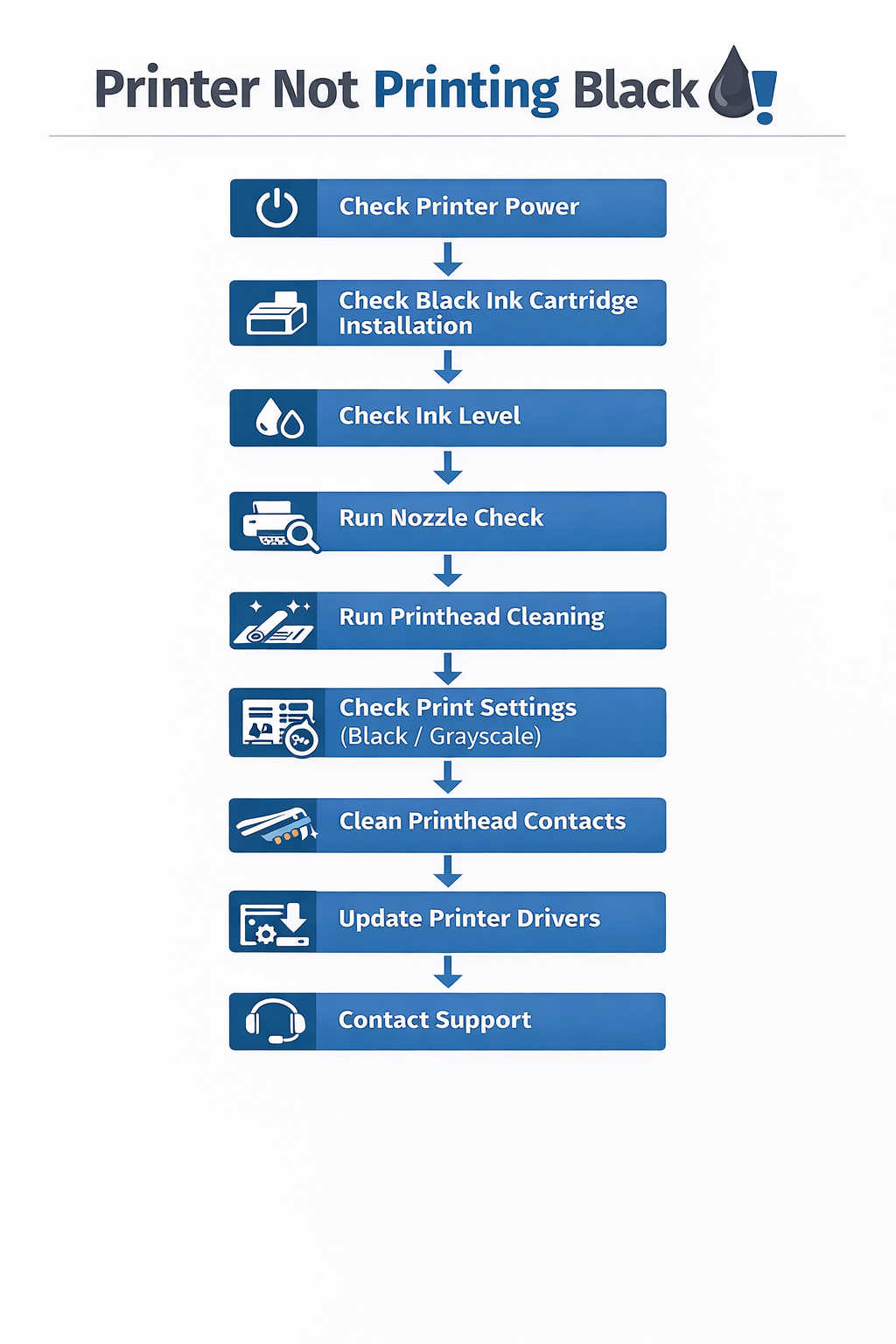
Table of Contents
Why Printer Not Printing Black Happens
There are several reasons why a printer may fail to print black ink.
The most common causes include:
- empty black ink cartridge
- clogged printhead nozzles
- dried ink inside the printhead
- incorrect printer settings
- outdated printer drivers
Inkjet printers spray microscopic droplets of ink onto paper. If the nozzles become blocked, the printer may stop producing black ink entirely.
Learn more about inkjet printing technology: https://en.wikipedia.org/wiki/Inkjet_printing
Understanding these causes helps identify the correct solution for a black ink printing issue.
Common Symptoms of Black Ink Problems
Users experiencing black ink failure may notice several symptoms.
Typical signs include:
- documents missing black text
- faded printing
- blank areas where black ink should appear
- streaks or lines in printed documents
These symptoms usually indicate cartridge problems or clogged printheads.
Printer Not Printing Black Fix: Step-by-Step Guide
Follow these troubleshooting steps to fix a black ink printing problem.
1. Check the Black Ink Cartridge
The most common reason for black ink failure is an empty cartridge.
Steps:
- open the printer cartridge compartment
- check the black ink level
- replace the cartridge if necessary
Installing a new cartridge often resolves the issue immediately.
2. Run the Printhead Cleaning Tool
Most printers include a built-in maintenance tool for cleaning the printhead.
Steps:
- open printer maintenance settings
- select printhead cleaning
- run the cleaning cycle
Cleaning the printhead may restore black ink flow.
3. Perform Deep Cleaning
If the standard cleaning cycle does not fix the black ink problem, perform a deep cleaning cycle.
Deep cleaning forces ink through the nozzles and clears stubborn blockages.
4. Print a Nozzle Check Page
A nozzle check page shows the ink pattern printed by the printer.
If the black pattern appears incomplete or missing, the printhead may need cleaning.
5. Remove and Reinstall the Cartridge
Improper cartridge installation may cause printing problems.
Steps:
- remove the black cartridge
- clean the electrical contacts
- reinstall the cartridge securely
Reinstalling the cartridge may fix a black ink issue.
6. Check Printer Settings
Some printers allow color-only printing.
Open the printer settings and make sure black ink printing is enabled.
7. Update Printer Drivers
Outdated drivers may cause printing problems.
Steps:
- open Device Manager
- locate the printer
- select update driver
Printer drivers allow the operating system to communicate with the printer hardware. Learn more about printer drivers: https://en.wikipedia.org/wiki/Printer_driver
Updating drivers may resolve a black ink printing error.
8. Restart the Printer
Restarting the printer resets internal components and clears temporary system errors.
This simple step sometimes restores black ink printing.
9. Clean the Printhead Manually
If automatic cleaning fails, manual cleaning may be required.
Steps:
- remove the printhead
- clean it with distilled water or cleaning solution
- reinstall the printhead
Manual cleaning may restore clogged nozzles.
10. Replace the Printhead
If none of the troubleshooting steps resolve the black ink problem, the printhead may be damaged.
Replacing the printhead may permanently restore black printing.
Common Black Ink Printing Problems
| Problem | Cause | Solution |
|---|---|---|
| missing black text | clogged printhead | run cleaning cycle |
| faded black printing | low ink | replace cartridge |
| blank pages | empty cartridge | install new cartridge |
| uneven printing | dried ink | deep clean printhead |
Tables help quickly identify the cause of printing issues.
Black Ink Issues on Inkjet Printers
Inkjet printers are most likely to experience black ink failure because they use liquid ink cartridges.
Clogged printheads, dried ink, or empty cartridges may prevent black ink from printing correctly.
Running regular cleaning cycles helps maintain print quality.
Black Toner Problems on Laser Printers
Laser printers use toner instead of liquid ink.
If a laser printer stops printing black, the issue may be caused by:
- empty toner cartridge
- worn drum unit
- dirty internal components
Replacing the toner cartridge usually resolves the issue.
Troubleshooting Workflow
Use this workflow when diagnosing a black ink printing problem.
This workflow helps identify the root cause quickly.
Related Printer Troubleshooting Guides
If the problem continues, explore these guides.
These guides provide additional solutions for printer problems.
Preventing Black Ink Printing Problems
Preventive maintenance can reduce the chances of black ink issues.
Recommended practices include:
- printing regularly to prevent dried ink
- keeping cartridges properly installed
- using genuine ink cartridges
- performing periodic printhead cleaning
Following these steps helps prevent problems with black ink.
Frequently Asked Questions
Why is my printer not printing black ink?
A printer not printing black issue may occur because of clogged printheads, empty cartridges, or incorrect printer settings.
How do I fix my printer if it won't print black?
Run printhead cleaning, check the cartridge, and reinstall the printer driver if necessary.
Can dried ink stop black printing?
Yes. Dried ink inside the printhead may block the nozzles and prevent black ink from printing.
Conclusion
A printer not printing black issue can affect document quality, but it is usually easy to fix. Checking the cartridge, cleaning the printhead, updating drivers, and replacing damaged components can restore normal printing.
Following the troubleshooting steps in this guide will help resolve black ink problems and ensure reliable printing performance.
© All About Printers — independent printer guides